RSO Re-Registration and Training
Every year, Registered Student Organizations are required to re-register their organization to maintain their registered status. Re-registration opens August 3rd at 9:00 AM. Required officers (President, Treasurer, Secretary, and Advisor) must complete the training on Canvas. Your organization's president must also complete the re-registration form on Involvement Link. All officer training and the re-registration form must be completed by September 25, 2026, by 5:00 PM. Failure to complete your training on time will result in a decrease in your organization’s budget for this academic year and a potential loss of RSO status . Please see the schedule below:
- You will receive 100% of your allocation if registered by 09/25/26 at 5pm.
- You will receive 90% of your allocation if registered by 10/2/26 at 5pm.
- You will receive 75% of your allocation if registered by 10/9/26 at 5pm.
- You will receive 0% of your allocation if registered after 10/16/26 at 5pm.
- You will lose all funding and RSO status if not registered by 10/16/26 at 5pm.
Please note: All officers and advisors will be removed from the Canvas training on July 27th, so the training can be updated and old officers removed. All current officers and advisors will be re-added to the new training at the beginning of re-registration. Every officer and advisor must complete the training every year during Re-registration.
Update Officers on Involvement Link
As we approach RSO Re-registration, it's crucial to update your organization’s officers on Involvement Link. If the officers or advisors are not accurate on Involvement Link, the wrong people will get your re-registration information and training. To update your officers or advisors on Involvement link, presidents are required to fill out our E-Board Position Update Form.
Re-registration Form on Involvement Link (For Presidents)
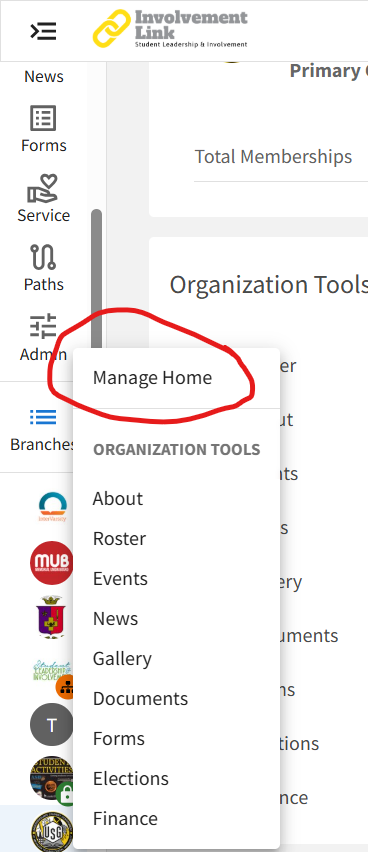
To complete the RSO Re-registration on Involvement Link, head to your RSO’s “Manage Home” found by clicking on the gear associated with your RSO on the column of the left side of the Involvement Link page.
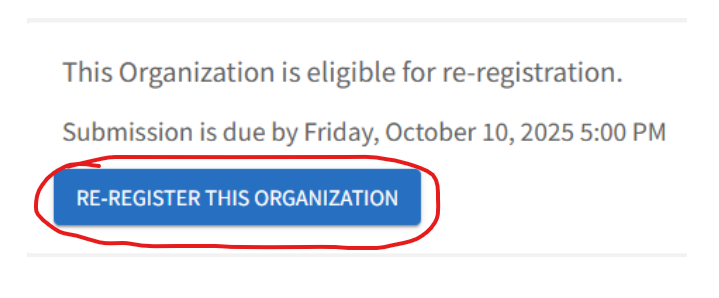
To complete the Re-registration process you must complete the form at the blue link, “Re-Register This Organization.”